Simulations
pynamics.simulations
This module provides several classes for simulating dynamical systems. Both open-loop and closed-loop simulations are supported.
Classes:
| Name | Description |
|---|---|
Sim |
Simulate a dynamical system and plot the results. |
Sim(system, input_signal, t0=0.0, tfinal=10.0, solver='RK4', step_size=0.001, mode='open_loop', controller=None, reference_labels=None, reference_lookahead=1, noise_power=0.0, noise_seed=0)
Bases: _BaseSimulator
Simulate a dynamical system.
This class can be used to simulate the behaviour of a dynamical system. It supports both open- and closed-loop simulations, which makes it appropriate for both system analysis and control design.
Parameters:
| Name | Type | Description | Default |
|---|---|---|---|
system |
BaseModel
|
System to simulate. Must be described by a model supported by Pynamics. |
required |
input_signal |
ndarray
|
Input signals. These may be reference values or other external inputs (e.g. wind speed in a wind turbine system). |
required |
t0 |
float
|
Initial time instant. Must be non-negative. |
0.0
|
tfinal |
float
|
Final time instant. Must be non-negative. |
0.0
|
solver |
(RK4, Euler, Modified_Euler, Heun)
|
Fixed-step solver. |
"RK4"
|
step_size |
float
|
Solver step size. Must be positive. |
0.001
|
mode |
(open_loop, closed_loop)
|
Simulation mode. The controller will not be included in the simulation unless parameter is set to "closed_loop". |
"open_loop"
|
controller |
BaseController | None
|
Controller. |
None
|
reference_labels |
list[str] | None
|
List of labels for the reference signals. |
None
|
reference_lookahead |
int
|
Number of time steps ahead for which the reference values are known to the controller. |
1
|
noise_power |
int | float
|
White noise power. If equal to zero, no noise will be added to the simulation. |
0.0
|
noise_seed |
int
|
Random seed for the noise array. |
0
|
Attributes:
| Name | Type | Description |
|---|---|---|
system |
BaseModel
|
The system to simulate. |
options |
dict
|
Simulation options (initial and final time instants). |
solver |
_FixedStepSolver
|
Solver. |
time |
ndarray
|
Time array. |
inputs |
ndarray
|
The input signals. |
outputs |
ndarray
|
The output signals. |
noise |
ndarray
|
Array of white noise values. |
control_actions |
ndarray
|
Array of control actions. |
controller |
BaseController
|
Controller. |
ref_lookahead |
int
|
Number of time steps ahead for which the reference values are known to the controller. |
ref_labels |
list[str]
|
List of labels for the reference signals. |
Methods:
| Name | Description |
|---|---|
summary |
Display the current simulation settings. |
run |
Run a simulation. |
reset |
Reset the output and control actions arrays, as well as the system's state and input vectors, so that a new simulation can be run. |
tracking_plot |
Evaluate the system's tracking performance by plotting the reference signal and the system's output (SISO systems only). |
system_outputs_plot |
Visualise the system's output signals. |
step_response |
Simulate the system's step response (single-input systems or single-reference controllers only). |
ramp |
Simulate the system's response to a ramp signal (single-input systems or single-reference controllers only). |
Raises:
| Type | Description |
|---|---|
TypeError
|
If a value of the wrong type is passed as a parameter. |
ValueError
|
If the value of any parameter is invalid (e.g. input signal has the wrong length, |
Warning
Only fixed-step solvers are support at the moment.
Source code in pynamics/simulations.py
inputs: np.ndarray
property
writable
Get the input signals.
This method can be used to access the input / reference signals using dot notation.
Returns:
| Type | Description |
|---|---|
ndarray
|
System input signals. |
ref_lookahead: int
property
writable
Get the ref_lookahead parameter.
This method can be used to access the value of the ref_lookahead parameter using dot notation.
Returns:
| Type | Description |
|---|---|
int
|
Number of time steps ahead for which the reference values are known to the controller. |
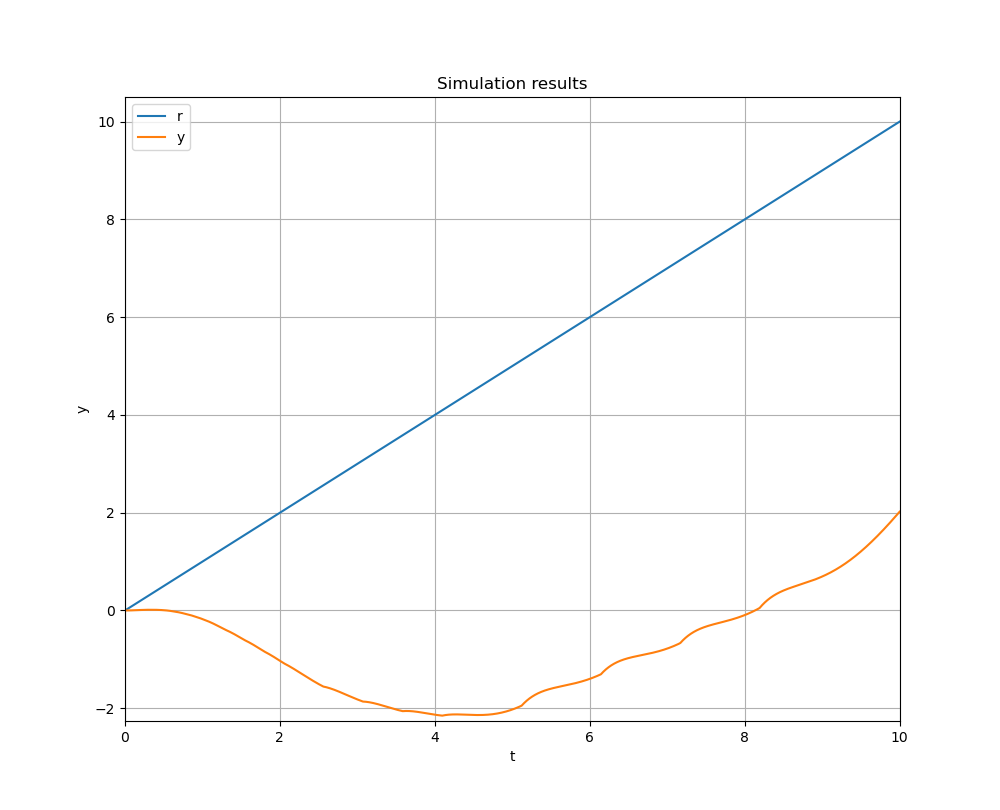
ramp(system, slope=1.0, t0=0.0, tfinal=10.0, solver='RK4', step_size=0.001, mode='open_loop', controller=None, reference_labels=None, reference_lookahead=1, noise_power=0.0, noise_seed=0)
classmethod
Simulate the system's response to a ramp signal.
This method can be used to simulate a system's response to a ramp input. Keep in mind that, for now, it should only be used with single-input systems or controllers needing only one reference signal.
Parameters:
| Name | Type | Description | Default |
|---|---|---|---|
system |
BaseModel
|
System to simulate. Must be described by a model supported by Pynamics. |
required |
slope |
int | float
|
The ramp's slope. Unit ramp by default. |
1.0
|
t0 |
float
|
Initial time instant. Must be non-negative. |
0.0
|
tfinal |
float
|
Final time instant. Must be non-negative. |
0.0
|
solver |
(RK4, Euler, Modified_Euler, Heun)
|
Fixed-step solver. |
"RK4"
|
step_size |
float
|
Solver step size. Must be positive. |
0.001
|
mode |
(open_loop, closed_loop)
|
Simulation mode. The controller will not be included in the simulation unless parameter is set to "closed_loop". |
"open_loop"
|
controller |
BaseController | None
|
Controller. |
None
|
reference_labels |
list[str] | None
|
List of labels for the reference signals. |
None
|
reference_lookahead |
int
|
Number of time steps ahead for which the reference values are known to the controller. |
1
|
noise_power |
int | float
|
White noise power. If equal to zero, no noise will be added to the simulation. |
0.0
|
noise_seed |
int
|
Random seed for the noise array. |
0
|
Returns:
| Type | Description |
|---|---|
Sim
|
A simulation class instance. |
Warning
It seems this method might be somewhat inaccurate at the moment. Results might not be as reliable.
Examples:
>>> import numpy as np
>>> from pynamics.models.state_space_models import LinearModel
>>> from pynamics.simulations import Sim
>>>
>>> A = np.array([[0, 0, -1], [1, 0, -3], [0, 1, -3]]);
>>> B = np.array([1, -5, 1]).reshape(-1, 1);
>>> C = np.array([0, 0, 1]);
>>> D = np.array([0]);
>>> model = LinearModel(np.zeros((3, 1)), np.zeros((1, 1)), A, B, C, D);
>>>
>>> simulation = Sim.ramp(model, slope=1);
>>> res = simulation.run();
>>>
>>> _ = Sim.tracking_plot(res, "Time", "Ref_1", "y_1");
Source code in pynamics/simulations.py
831 832 833 834 835 836 837 838 839 840 841 842 843 844 845 846 847 848 849 850 851 852 853 854 855 856 857 858 859 860 861 862 863 864 865 866 867 868 869 870 871 872 873 874 875 876 877 878 879 880 881 882 883 884 885 886 887 888 889 890 891 892 893 894 895 896 897 898 899 900 901 902 903 904 905 906 907 908 909 910 911 912 913 914 915 916 917 918 919 920 921 922 923 924 925 926 927 928 929 930 931 932 | |
reset(initial_state, initial_control)
Reset simulation parameters (initial conditions, output arrays, control actions).
This method must be called every time one wishes to run another simulation. The initial conditions, output array and control actions array are all reset. This method is useful if one wishes to run simulations with different initial conditions or different controllers.
Parameters:
| Name | Type | Description | Default |
|---|---|---|---|
initial_state |
ndarray
|
The system's initial state. Should be an array shaped (n, 1), where n is the number of state variables. |
required |
initial_control |
ndarray | float
|
The inputs' initial value(s). Should be an array shaped (u, 1), where u is the number of input variables. |
required |
Examples:
>>> import numpy as np
>>> from pynamics.models.state_space_models import LinearModel
>>> from pynamics.simulations import Sim
>>>
>>> A = np.array([[0, 0, -1], [1, 0, -3], [0, 1, -3]]);
>>> B = np.array([1, -5, 1]).reshape(-1, 1);
>>> C = np.array([0, 0, 1]);
>>> D = np.array([0]);
>>> model = LinearModel(np.zeros((3, 1)), np.zeros((1, 1)), A, B, C, D);
>>>
>>> simulation = Sim(model, input_signal=np.ones(int(10/0.001)+1));
>>> res = simulation.run();
>>> simulation.system.x
array([[7.98056883],
       [1.96495125],
       [0.98406462]])
>>>
>>> simulation.reset(np.zeros((3, 1)), np.zeros((1, 1)));
Sim outputs and control actions were reset sucessfully.
>>> simulation.system.x
array([[0.],
       [0.],
       [0.]])
Source code in pynamics/simulations.py
run()
Run a simulation.
This method is used to run a simulation.
Returns:
| Type | Description |
|---|---|
DataFrame
|
Data frame containing the results. |
Examples:
>>> import numpy as np
>>> from pynamics.models.state_space_models import LinearModel
>>> from pynamics.simulations import Sim
>>>
>>> A = np.array([[0, 0, -1], [1, 0, -3], [0, 1, -3]]);
>>> B = np.array([1, -5, 1]).reshape(-1, 1);
>>> C = np.array([0, 0, 1]);
>>> D = np.array([0]);
>>> model = LinearModel(np.zeros((3, 1)), np.zeros((1, 1)), A, B, C, D);
>>>
>>> simulation = Sim(model, input_signal=np.ones(int(10/0.001)+1));
>>> res = simulation.run();
>>> res
         Time  Ref_1  u_1       y_1
0       0.000    1.0  0.0  0.000000
1       0.001    1.0  1.0  0.000996
2       0.002    1.0  1.0  0.001984
3       0.003    1.0  1.0  0.002964
4       0.004    1.0  1.0  0.003936
...       ...    ...  ...       ...
9996    9.996    1.0  1.0  0.984014
9997    9.997    1.0  1.0  0.984026
9998    9.998    1.0  1.0  0.984039
9999    9.999    1.0  1.0  0.984052
10000  10.000    1.0  1.0  0.984065

[10001 rows x 4 columns]
Source code in pynamics/simulations.py
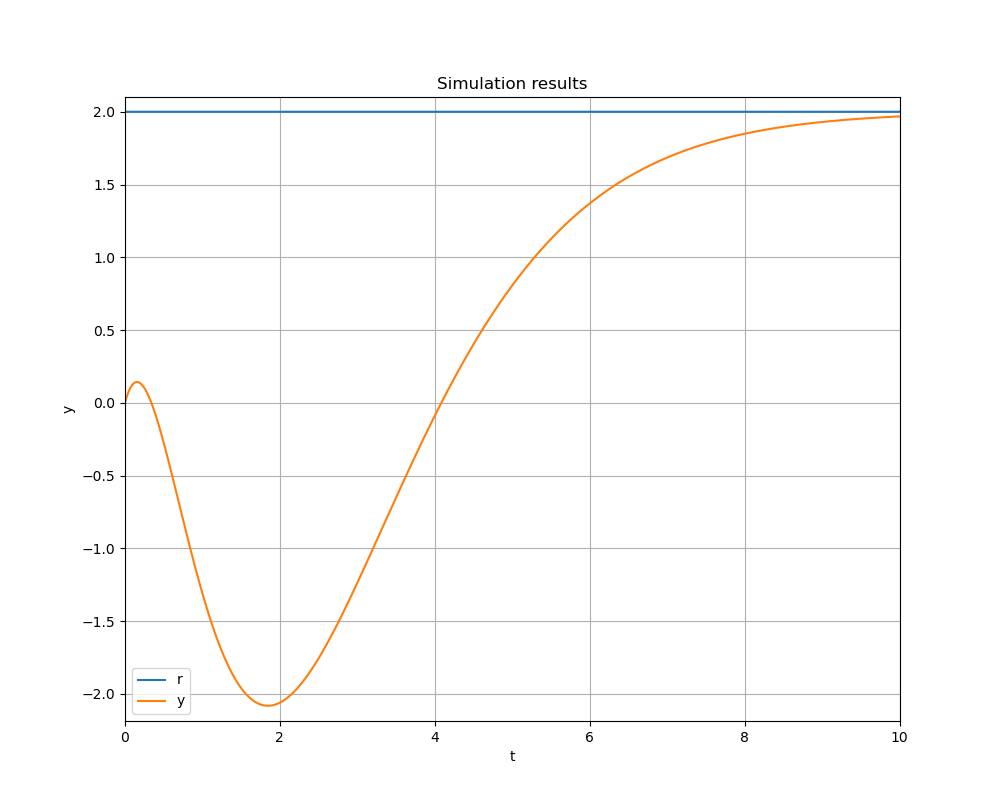
step_response(system, step_magnitude=1.0, t0=0.0, tfinal=10.0, solver='RK4', step_size=0.001, mode='open_loop', controller=None, reference_labels=None, reference_lookahead=1, noise_power=0.0, noise_seed=0)
classmethod
Simulate the step response of a dynamical system.
This method can be used to simulate a system's step response. Keep in mind that, for now, it should only be used with single-input systems or controllers needing only one reference signal.
Parameters:
| Name | Type | Description | Default |
|---|---|---|---|
system |
BaseModel
|
System to simulate. Must be described by a model supported by Pynamics. |
required |
step_magnitude |
int | float
|
The step's magnitude. Unit step by default. |
1.0
|
t0 |
float
|
Initial time instant. Must be non-negative. |
0.0
|
tfinal |
float
|
Final time instant. Must be non-negative. |
0.0
|
solver |
(RK4, Euler, Modified_Euler, Heun)
|
Fixed-step solver. |
"RK4"
|
step_size |
float
|
Solver step size. Must be positive. |
0.001
|
mode |
(open_loop, closed_loop)
|
Simulation mode. The controller will not be included in the simulation unless parameter is set to "closed_loop". |
"open_loop"
|
controller |
BaseController | None
|
Controller. |
None
|
reference_labels |
list[str] | None
|
List of labels for the reference signals. |
None
|
reference_lookahead |
int
|
Number of time steps ahead for which the reference values are known to the controller. |
1
|
noise_power |
int | float
|
White noise power. If equal to zero, no noise will be added to the simulation. |
0.0
|
noise_seed |
int
|
Random seed for the noise array. |
0
|
Returns:
| Type | Description |
|---|---|
Sim
|
A simulation class instance. |
Examples:
>>> import numpy as np
>>> from pynamics.models.state_space_models import LinearModel
>>> from pynamics.simulations import Sim
>>>
>>> A = np.array([[0, 0, -1], [1, 0, -3], [0, 1, -3]]);
>>> B = np.array([1, -5, 1]).reshape(-1, 1);
>>> C = np.array([0, 0, 1]);
>>> D = np.array([0]);
>>> model = LinearModel(np.zeros((3, 1)), np.zeros((1, 1)), A, B, C, D);
>>>
>>> simulation = Sim.step_response(model, step_magnitude=2);
>>> res = simulation.run();
>>>
>>> _ = Sim.tracking_plot(res, "Time", "Ref_1", "y_1");
Source code in pynamics/simulations.py
731 732 733 734 735 736 737 738 739 740 741 742 743 744 745 746 747 748 749 750 751 752 753 754 755 756 757 758 759 760 761 762 763 764 765 766 767 768 769 770 771 772 773 774 775 776 777 778 779 780 781 782 783 784 785 786 787 788 789 790 791 792 793 794 795 796 797 798 799 800 801 802 803 804 805 806 807 808 809 810 811 812 813 814 815 816 817 818 819 820 821 822 823 824 825 826 827 828 829 | |
summary()
Display the current simulation settings.
This method displays the value of the most important simulation options.
Examples:
>>> import numpy as np
>>> from pynamics.models.state_space_models import LinearModel
>>> from pynamics.simulations import Sim
>>>
>>> A = np.array([[0, 0, -1], [1, 0, -3], [0, 1, -3]]);
>>> B = np.array([1, -5, 1]).reshape(-1, 1);
>>> C = np.array([0, 0, 1]);
>>> D = np.array([0]);
>>> model = LinearModel(np.zeros((3, 1)), np.zeros((1, 1)), A, B, C, D);
>>>
>>> simulation = Sim(model, input_signal=np.ones(int(10/0.001)+1));
>>> simulation.summary();
Simulation settings
-------------------
Initial time step: 0.0 s
Final time step: 10.0 s
Solver step size: 0.001 s
-------------------
Input signals format: (1, 10001)
Output signals format: (1, 10001)
Control actions format: (1, 10001)
Reference lookahead: 1 time step
-------------------
Simulation mode: open_loop
Source code in pynamics/simulations.py
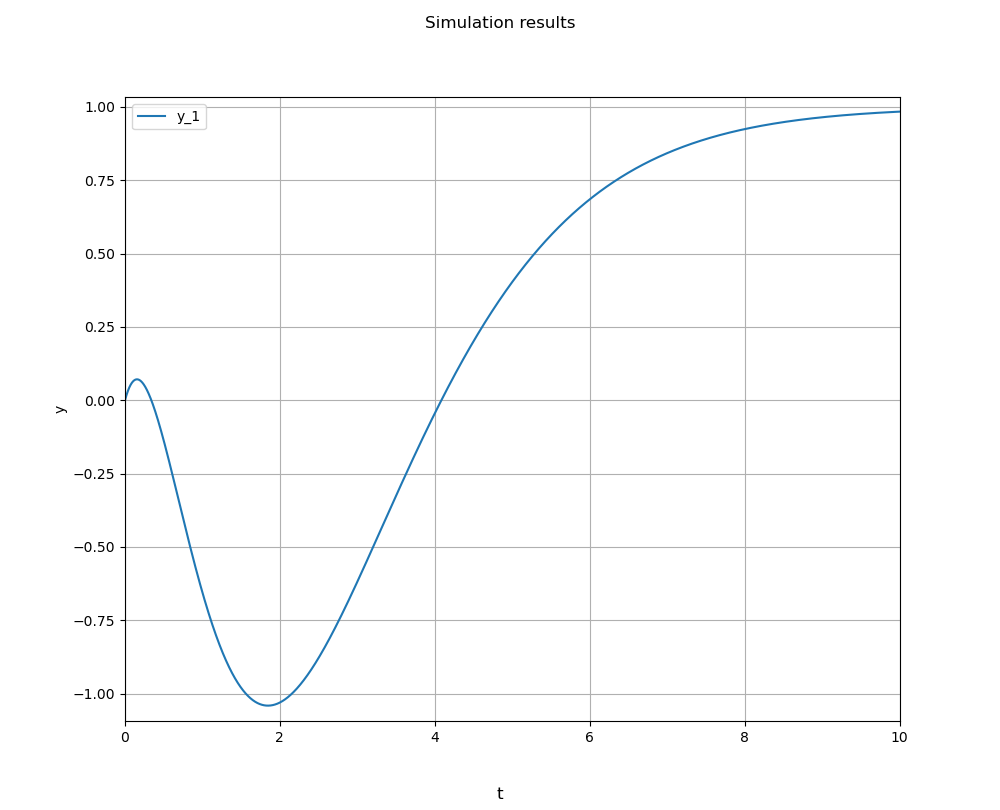
system_outputs_plot(sim_results, time_variable, outputs, plot_title='Simulation results', xlabel='t', ylabel='y', plot_height=10.0, plot_width=10.0)
staticmethod
Visualise the system's output signals.
This method can be use to visualise the system's output signals simultaneously. It supports MIMO systems.
Parameters:
| Name | Type | Description | Default |
|---|---|---|---|
sim_results |
DataFrame
|
Simulation results. |
required |
time_variable |
str
|
Name of the time variable. |
required |
outputs |
list[str]
|
List containing the names of the output variables. |
required |
plot_title |
str
|
Plot title. |
"Simulation results"
|
xlabel |
str
|
X-axis label. |
"t"
|
ylabel |
str
|
Y-axis label |
"y"
|
plot_height |
int | float
|
Figure height. |
10.0
|
plot_width |
int | float
|
Figure width. |
10.0
|
Examples:
>>> import numpy as np
>>> from pynamics.models.state_space_models import LinearModel
>>> from pynamics.simulations import Sim
>>>
>>> A = np.array([[0, 0, -1], [1, 0, -3], [0, 1, -3]]);
>>> B = np.array([1, -5, 1]).reshape(-1, 1);
>>> C = np.array([0, 0, 1]);
>>> D = np.array([0]);
>>> model = LinearModel(np.zeros((3, 1)), np.zeros((1, 1)), A, B, C, D);
>>>
>>> simulation = Sim(model, input_signal=np.ones(int(10/0.001)+1));
>>> res = simulation.run();
>>>
>>> _ = Sim.system_outputs_plot(res, "Time", ["y_1"]);
Source code in pynamics/simulations.py
638 639 640 641 642 643 644 645 646 647 648 649 650 651 652 653 654 655 656 657 658 659 660 661 662 663 664 665 666 667 668 669 670 671 672 673 674 675 676 677 678 679 680 681 682 683 684 685 686 687 688 689 690 691 692 693 694 695 696 697 698 699 700 701 702 703 704 705 706 707 708 709 710 711 712 713 714 715 716 717 718 719 720 721 722 723 724 725 726 727 728 729 | |
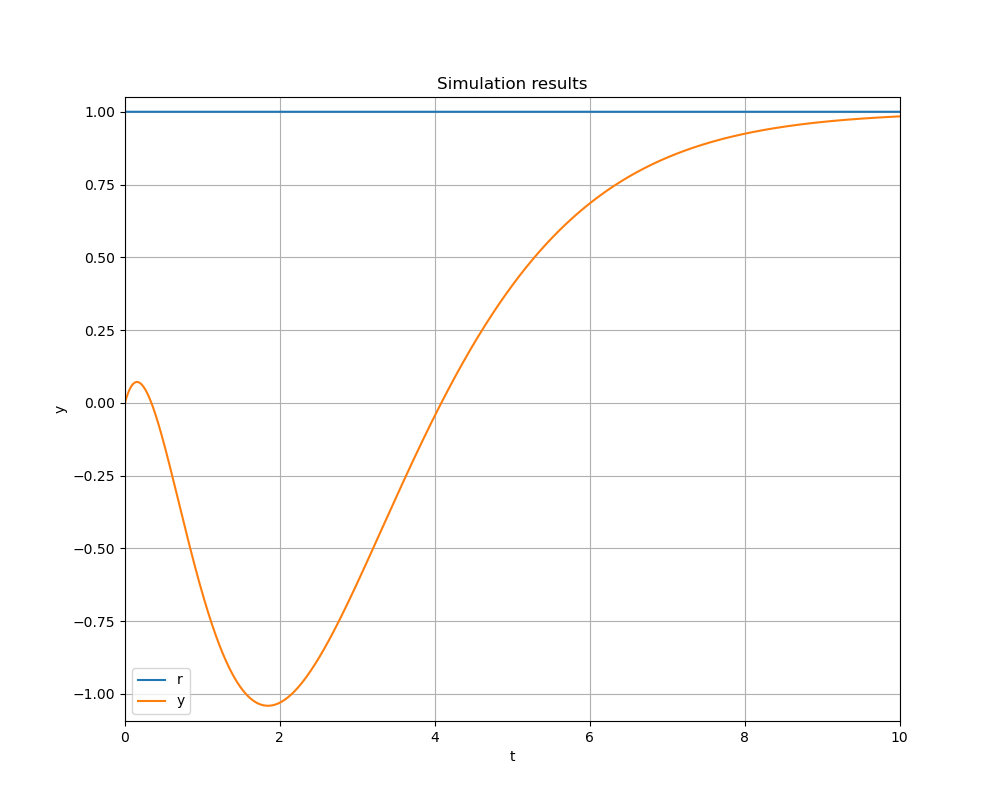
tracking_plot(sim_results, time_variable, reference, output, plot_title='Simulation results', xlabel='t', ylabel='y', plot_height=10.0, plot_width=10.0)
staticmethod
Plot the reference signal and the system's output.
Evaluate the system's tracking performance by plotting the reference signal and the system's output (SISO systems only).
Parameters:
| Name | Type | Description | Default |
|---|---|---|---|
sim_results |
DataFrame
|
Simulation results. |
required |
time_variable |
str
|
Name of the time variable. |
required |
reference |
str
|
Name of the reference variable. |
required |
output |
str
|
Name of the output variable. |
required |
plot_title |
str
|
Plot title. |
"Simulation results"
|
xlabel |
str
|
X-axis label. |
"t"
|
ylabel |
str
|
Y-axis label. |
"y"
|
plot_height |
int | float
|
Figure height. |
10.0
|
plot_width |
int | float
|
Figure width. |
10.0
|
Examples:
>>> import numpy as np
>>> from pynamics.models.state_space_models import LinearModel
>>> from pynamics.simulations import Sim
>>>
>>> A = np.array([[0, 0, -1], [1, 0, -3], [0, 1, -3]]);
>>> B = np.array([1, -5, 1]).reshape(-1, 1);
>>> C = np.array([0, 0, 1]);
>>> D = np.array([0]);
>>> model = LinearModel(np.zeros((3, 1)), np.zeros((1, 1)), A, B, C, D);
>>>
>>> simulation = Sim(model, input_signal=np.ones(int(10/0.001)+1));
>>> res = simulation.run();
>>>
>>> _ = Sim.tracking_plot(res, "Time", "Ref_1", "y_1");
Source code in pynamics/simulations.py
556 557 558 559 560 561 562 563 564 565 566 567 568 569 570 571 572 573 574 575 576 577 578 579 580 581 582 583 584 585 586 587 588 589 590 591 592 593 594 595 596 597 598 599 600 601 602 603 604 605 606 607 608 609 610 611 612 613 614 615 616 617 618 619 620 621 622 623 624 625 626 627 628 629 630 631 632 633 634 635 636 | |